Showing posts with label Kodable. Show all posts

Friday, December 21, 2018

Coding in the Classroom

In my ICT adventures this month, I spent lots of time working on coding with students and teachers around Park West School Division.   December kicked off with Computer Science Education Week.  Across the globe, thousands of people took part in Hour of Code and the staff and students in PWSD were among those participants!   During CSED week, I supported three schools in offering whole school coding events, where every student got to participate in coding activities!  I also joined many other classrooms for coding activities throughout the month.  Some classes paired up with other grade levels for their programming activities and some classes worked on their own. Whether it was single-grade or multi-grade, whole-school or single-class coding activities, I loved being part of the learning and excitement around coding in our schools this month!

Inspired by the great work I witnessed this month, I wanted to share some of my thoughts on coding in the classroom.  I created some images to share my ideas with you!

Why teach coding? 


My 5 Favourite Tools for Teaching Coding & Computational Thinking

I've tried plenty of tools and activities over the last few years and I've developed some favourites that are my "go-to" tools when teaching coding and computational thinking.   The numerical list is not intended as a ranking system, I just have 5 things I use more than anything else!


Regardless of age, I always start with unplugged coding activities.   I like to use these activities to build a basic understanding of coding concepts before we work with technology.  I've developed lessons to teach students about sequencing, conditions, loops and more.   It really helps to include some unplugged lessons to ensure students understand the programs they are writing with technology!


Code.org has so much to offer.   They have a variety of activities for different ages, including both one-hour tutorials and full courses.   Spend some time digging around on their website and you're sure to find something suitable for your class!


Kodable was a favourite in my Grade 1 and 2 classes and it has been very popular in K-4 classrooms around the division.  The free content is a great start, plus they offer paid content if you'd like to offer more coding activities for your students. 


Thanks to Kids Code Jeunesse, our schools now have micro:bit sets for teaching programming!  It's awesome when students can see their programs run on an external device and I'm excited about the possibilities for these pocket-sized computers!


I have two of each of these robots in my ICT kit and they've traveled with me all over PWSD for the last several months!  


Thursday, October 8, 2015

Kids Who Code: Kodable

If you've been following our blog, you know that we've started coding in Grade 1!  We have successfully been using a fun, kid-friendly tool called Kodable. 

Today, we took some time to reflect and share our ideas about Kodable.  We are sending this information on to the Kodable organization so they know what our class thinks about their coding tool!  

Coding is very fun and I like getting to higher levels - B.
I like to play Kodable with a friend. - J.
I don't like when the fuzz gets stuck. Then we have to try again. - B
I really like when it is on the last arrow, then I've done it all right.  I did it. - J.
I did like that the levels were hard enough for me.  - A.
I like the hard levels because I smash into the bugs in the dirt. - C.
I like when I unlock levels.  - C.
I love hard levels because they are fun.  - L.
I like unlocking new fuzzes.  The special commands are hard.  - R.
I like checking the path by tracing it with my finger. - A.
Is there going to be a Kodable 2 or an update for Kodable? - A.
I've unlocked Ruby Fuzz and Shadow Fuzz at home! - A.
I like to play the game Kodable because it helps me get better at coding and it is fun.  - M.
I like when I don't get it right because I can always try again. - K.


I was very impressed with the thoughtful and honest responses from my students.  We will be trying out some new coding tools in the upcoming weeks, but I am sure Kodable will remain a class favourite!

Wednesday, October 7, 2015

Kids Who Code: We've Started Coding!


Our class has started exploring coding!   This is the basic information about coding that I sent home to families last week.  Read on to find out more about coding!
What is coding?
According to Code Conquest, "Coding is what makes it possible for us to create computer software, apps and websites. Your browser, your OS, the apps on your phone, Facebook ... they’re all made with code." 

Coding is what many of us call "computer science" or "computer programming" and, in the simplest terms, coding is how we give computers directions/instructions. 

Why teach coding? 
Personally, I feel that coding helps students develop critical-thinking and problem-solving skills.  Coding also provides opportunities for practicing math, reading and art/design.  Although my students are still very young, coding is also important in MANY jobs!  I think it is great that young learners can try out coding in a kid-friendly, fun situation before they get older and are intimidated by the idea of “computer science”. 

How are we learning to code?
Since there is a strong movement to include coding in schools, there are a number of kid-friendly coding tools now available.  At this point, our class is using a fun tool called Kodable to learn about giving coding directions.  Kodable is available as a free iOS app or you can play/download it online at http://game.kodable.com/  


Monday, December 15, 2014

Kids Who Code Code-a-thon

On Friday, December 12th our class co-hosted the Kids Who Code Code-a-thon with Mrs. Caldwell's Kindergarten class at Oak Lake Community School.  After preparing for this event over the last few weeks, my Grade 2s were very excited to lead their coding activities and share their coding expertise.  I was incredibly proud of the Grade 2s as I watched them teach other (younger and older) students and community members about coding.  Each group of 2-3 students from our class ran a station for the event, which featured tools such as Tynker, Code Monkey, Kodable, Hopscotch, Daisy the Dinosaur, Lightbot , Kodu & Scratch Jr. 

Over 150 students were involved in the event, yet the OLCS gym was often quiet as engaged learners tackled computer programming challenges using a variety of kid-friendly coding tools. Cheers of "I got it" and comments such as "this is cool" were reassurance that coders were having an exciting and positive experience despite the quiet, focused atmosphere. 

We had great support from our communities, which is much appreciated.  Several special guests, including representatives from Park West School Division, Fort La Bosse School Division, RM and Town of Hamiota, RM of Woodworth and the Virden Oil Capitals Jr. Hockey team were in attendance.  Microsoft in Education Canada also supported us as Expert Educator Fellows.  We are really excited about the success of this inaugural event and we've already starting talking about what's next...


Thursday, December 11, 2014

Kids Who Code: Preparing for our Code-a-thon

Our preparation for the Code-a-thon has focused on becoming coding experts so we can help others during the event.  Students submitted their top choices for coding tools they'd like to focus on and from there we created teams to "specialize" in each coding tool.  Students were in charge of exploring the app and becoming familiar with how to code using the specific tool.  Each team also created a set of instructions with text and screenshots.  I'm really proud of my students' work and I wanted to share their instructions for each coding tool in case other classes find them helpful.  Click here to see our instructions for Kodable, Tynker, Hopscotch, Code Monkey, Lightbot, Scratch Jr and Daisy the Dinosaur!


We are so excited for our Code-a-thon at Oak Lake Community School tomorrow!  It's going to be a great learning experience!

Monday, November 24, 2014

Kids Who Code: Exploring and Evaluating Coding Tools

The Kids Who Code project is well underway in our classroom!  Our class has been exploring coding for the last couple of weeks.  We've learned that coding is "giving computers instructions/directions" and students have had the chance to try out a variety of coding tools.  My students have learned a lot (and so have I!)

Here is what we've been up to:

Exploration Time:
Students have used different devices to explore a variety of coding tools including Lightbot, Hopscotch, Kodable, Code Monkey, ScratchJr., Tynker and Daisy the Dinosaur.  These initial explorations were typically preceded by a short demonstration from me or a short video tutorial.  The instructions/demonstrations were minimal since I have limited experience with these tools and I wanted students to discover things on their own.  Due to the number of devices in our classroom, students worked in pairs or small groups to spend about 10-15 minutes with each app over the course of about 1 week. 

Evaluation and Feedback:
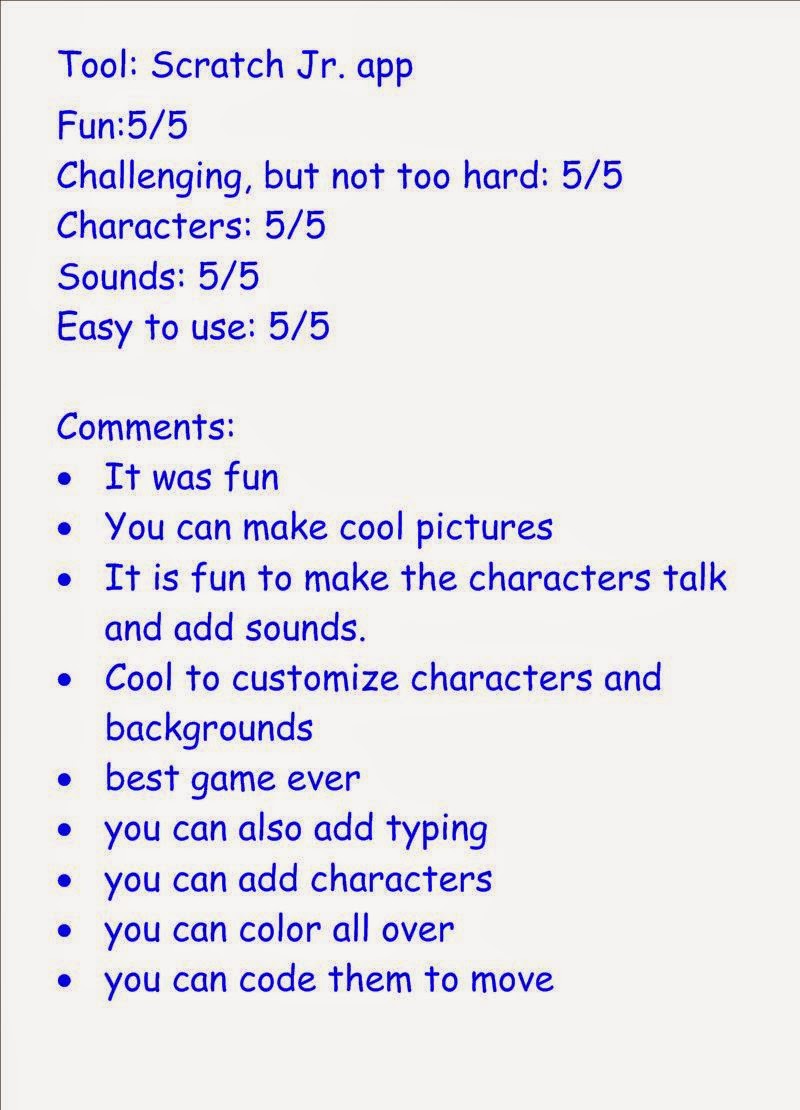
We decided on some important characteristics of coding tools and, after trying each tool, students used a simple 5 point rating scale to evaluate the tools.  Students also gave comments and suggestions.  In response to a student suggestion, we sent these evaluations to the creators of the app/tool via Twitter.  (A couple of them even responded to thank us for our feedback!). 


Kids Who Code Code-a-thon:

We are gearing up to take part in Hour of Code, which is an international movement to encourage people to try coding.  The Hour of Code week is from December 8-14th this year and we are co-hosting our own event to celebrate.  Working with Mrs. Caldwell and the Oak Lake Community School Kindergartens, we are organizing the Kids Who Code Code-a-thon.  During this event, my students will act as "coding experts" and teach others about coding.  With this goal in mind, students selected a coding tool to "specialize" in for the event.  We are now working in small teams to become experts with our selected tools and develop activities for Code-a-thon attendees to try out when they visit our stations at the event!  Meanwhile, we are supporting the Kindergartens as they plan the details of hosting the event at their school.  We are very excited to continue with this learning project!