Showing posts with label classroom. Show all posts

Friday, April 17, 2026

From Pencil to Publication: Book Creation at SCS

Ms. Fraser’s Grade 5 and 6 class at Strathclair Community School has been working diligently to develop their writing skills, undertaking the project of creating short stories.  Many students have now published their digital books with text and illustrations using Book Creator.  You can see their work showcased here in our PWSD Library:  https://read.bookcreator.com/library/-Ma-CVa4E0FsnEgnHer1


When I visited this class recently, the class shared the steps they’ve taken to create their work and it was evident that they’ve invested much time and energy in this writing project!  


Ms. Fraser provided a comprehensive planning guide to help students with the writing process.  Students used Ms. Fraser’s template to brainstorm and plan their title, setting, characters, problem, events/action in the story, resolution and conclusion.  Next, they drafted each section of the story including a beginning that introduces the setting and character(s), description of the key events in the story, a conclusion etc.   Students drafted each section of their story with paper and pencil before incorporating technology for the final publications.   


After drafting their stories, students created their books using Book Creator.  Authors added text and images, which could include hand-drawn illustrations or images sourced from the internet.  Students also recorded their voices to add narration for an audiobook version of their story.  


The Grade 5 and 6 class has shared their work with staff and students at their school and I’m excited that many of them gave me the opportunity to share their work online too! Choosing to publish their work led to some good conversations about online privacy and sharing. We explained that students who wished to publish would need to have completed PWSD permission forms for sharing work online. (This is part of our division's registration package that goes home each year for families or guardians to sign and is kept on record at the school office so we can check before sharing student work.). We also had a discussion about how much personal information students wanted to share in their published books: Did they want their full name listed as author or just a first name? Did they want to include their photo in the about the author section or not? Was it a good idea to include their full birthdate when sharing online? I think having these conversations in context is one of the best ways to help our students develop digital citizenship skills and online safety. Students chose to revise their books if they wanted to adjust how much they were sharing before I published them.


Thursday, June 27, 2013

Farewell: Looking Back on Grade 1

Today is our last day of Grade 1.  We did a lot of fun things this year and we learned a lot.  Here are our favorite things from Grade 1:
  • playing the Kinect
  • picking out of the birthday bag
  • writing
  • playing on the computers
  • making PhotoStories with the Grade 10s
  • math writing
  • reading
  • playing with lego
  • going outside for recess
  • free time
  • free gym
  • word study
  • playing games
  • working with Mrs. Obach
  • word study games
  • math games
  • helping people in Africa
  • helping animals
  • making bunny treats
  • adopting animals (7 polar bears, 1 meerkat, 1 orangutan)
  • having fun
  • going on a field trip to Alyssa's Ark Small Animal Rescue (and Montana's!)
  • going on a playground tour and picnic field trip with our Oak Lake Kindergarten friends
  • visits from the Lion's Club
  • playing PAX games
  • baking cookies to get money for adopting polar bears
  • having a garage sale to raise money to help people and animals
  • using technology
  • watching a movie, swimming and playing soccer
  • writing persuasive texts
  • Tweeting
  • getting Granny's Wacky Prizes 
  • word sorting with Mrs. Obach
  • writing retell texts
  • learning about 3D objects
  • doing math with a partner
Goodbye!  

Wednesday, June 5, 2013

Microsoft Virtual University: Understanding the Learning Strategies of the 21st Century Learner

Today's Microsoft Virtual University with Richard Olsen focused on what we know about good learning and teaching. 

Big Ideas:
  • How has learning and teaching changed?  
    • More student-directed, authentic, collaborative, interdisciplinary, differentiated learning.  Less teacher-directed.
  • We now have fast access to high-quality materials and resources online, which can help teachers and students.  How does access to high quality content change what schools and teachers need to provide?
    • Students need critical thinking skills to determine what information is relevant, factual, useful to their purpose
    • There is less need to provide "textbooks" or other learning materials in the traditional form and more need to provide a device that allows students access to the huge amount of information online. 
  • We have changed what we publish and publishing can be free.  
    • We no longer share only the "finished product"
    • We share our location, our thoughts, our intentions, short notes, works in progress using tools like Twitter, Facebook, Foursquare, blogs, websites etc. 
    • This sharing provides opportunities for intervention at various stages.  Students and teachers can get suggestions and feedback all the time!
    • Online publishing allows students to reach a wider audience, to collaboratively publish and to have a real impact in the world
    • Online publishing helps us share student work with families. 
  • Ease of collaboration provides opportunities for collective knowledge building 

Connections to our classroom:
  •  We have undertaken a number of collaborative projects with students in our classroom working together and working with other classrooms near and far.  Social media, video conferencing and online publishing have allowed us to collaborate and to reach a wider audience.  Our projects have included:
    • Environmental Awareness Campaign:Students encouraged people to care for the environment through their poster and video campaign.  Topics they addressed included tree planting and litter reduction. 

    • Reusable Bag Reminder Campaign: After researching reusable bag use, students learned that many people were forgetting their reusable bags.  Students came up with the solution of reusable bag reminders and then designed, created and distributed their reminders.   

    • Litterless Lunch Competition: students participated in an inter-classroom competition to have the most reusable containers in their lunch each day, thus reducing litter and helping the environment! 
    • Animal Rescue:In partnership with Alyssa’s Ark Small Animal Rescue, students learned about rescue animals and found ways to help local animals in need.  Students collected used blankets, towels and clothing to be reused as animal bedding at the rescue.  Students in Kindergarten made homemade dog biscuits and delivered them to the Humane Society just before Christmas. Students in Grade 1 traveled to Alyssa's Ark to volunteer and to deliver some homemade animal treats! 
    • Species Preservation: Polar Bear Adoption:Students decided they wanted to help animals this year.  They chose to adopt polar bears because of the threats they are facing, so they developed an action plan to fundraise and adopt bears through the World Wildlife Fund Symbolic Adoption Program.  Students successfully held a cookie sale fundraiser and adopted SEVEN polar bears!
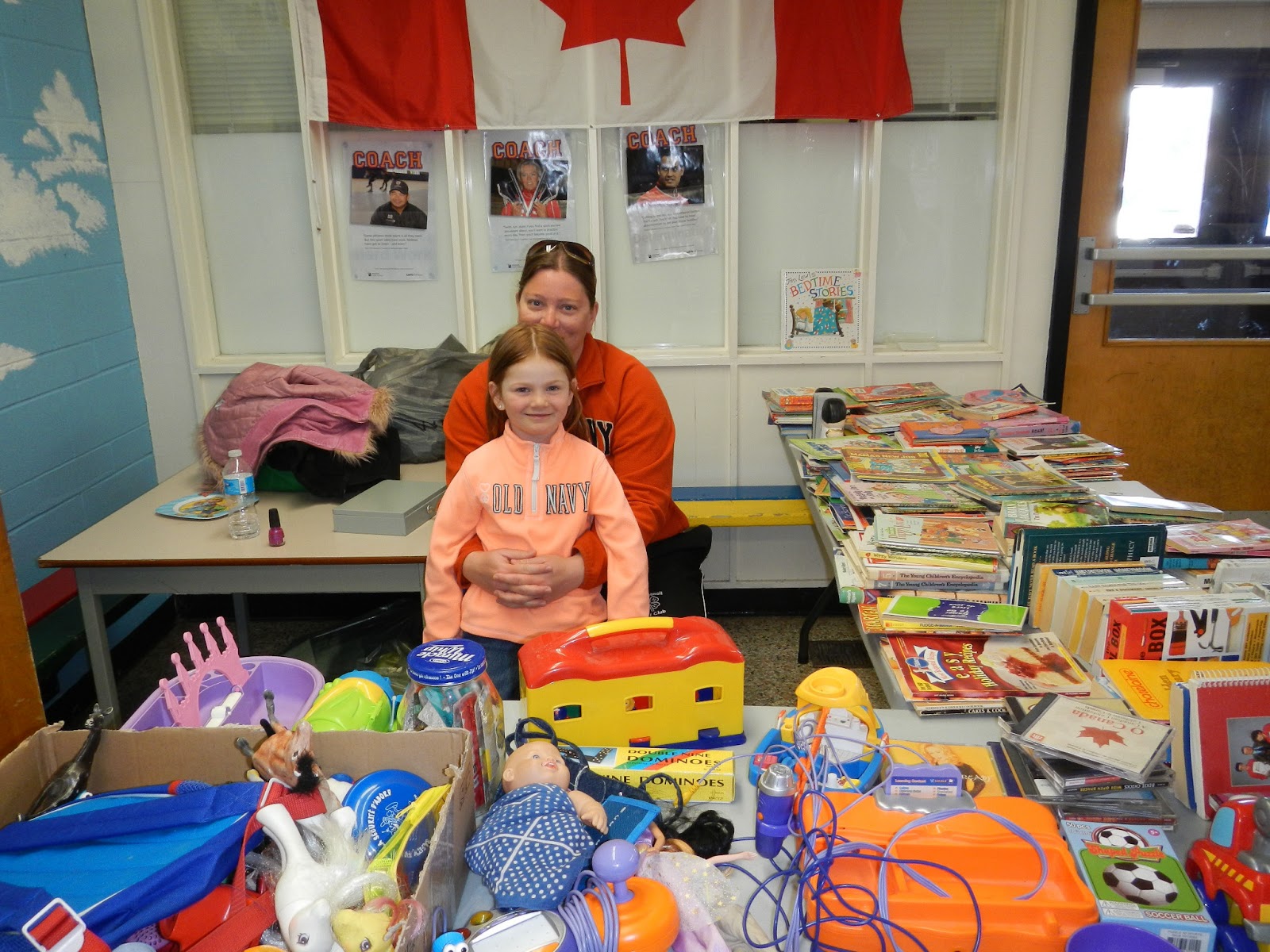
    • Recycle for Good Garage Sale: Students held a garage sale, selling unwanted toys, clothes, books and household items from many generous donors.  This student-run event raised $464 to help people and animals.
    • Schools Around the World Blog - We took part in a collaborative project that sharing information about our school and school life with other schools through a collaboratively-authored wiki. 

Friday, May 10, 2013

Field Trip: Alyssa's Ark Small Animal Rescue

As a part of our goal to help animals this year, we took a field trip to visit and volunteer at a real rescue organization.  Alyssa at Alyssa's Ark Small Animal Rescue in Brandon, MB graciously hosted us on Friday, May 3rd.

 Before we went, we decided that we'd like to make some treats for the animals kind of like our Oak Lake Kindergarten friends made dog biscuits for homeless dogs at the humane society.  Since Alyssa had a lot of rabbits, we researched recipes for rabbit treats on the internet and then sent our ideas to Alyssa to see if the rabbits would like the ingredients.  Next, we planned a grocery list and then took a trip to the local co-op to buy groceries.  When it was time to make treats, we took turns reading, measuring, mixing and scooping the treats. 


Our field trip went very well.  We got to meet the animals, ask questions about them and learn a bit about their rescue stories.  Our class split into two groups and both groups got turns to make toys for the animals, feed the animals and even pet some of the animals!  We were really lucky to have a partnership with Alyssa and we learned a lot from our visit to her rescue!


Wednesday, May 1, 2013

Recycle for Good Garage Sale: Animal Adoption

As I explained in a previous post, the grade 1s held their Recycle for Good Garage Sale on April 18th & 19th.  Their goal was to raise funds to help people in Africa (through World Vision) and to help animals (through the World Wildlife Fund Symbolic Adoption Program).  The idea came from Lilly, a student who was watching television one night and saw a commercial that showed some people in Africa need help getting clean water and fresh food.  Our class had discussed the idea of a garage sale earlier this school year, when we were brainstorming ways of fundraising for symbolically adopting animals.  We decided that our garage sale could benefit both people and animals!  When the Grade 1s decide to do something, they do it right....they raised $464 to help others! 


 Earlier this week, students suggested animals we may want to help from the WWF's symbolic adoption website.  Then students voted for the animals they would most like to adopt. Today, we were on a Skype video call with our partner class, Mrs. Caldwell's Kindergarten at Oak Lake Community School.  Students were sharing how well the garage sale went and one of the Grade 1s asked the Kindergartens if they would like to vote to help us choose the animals to adopt.  Here's our voting:


After we finished our call with the Kindergartens, we officially adopted 1 meerkat and 1 orangutan.  We can't wait for our adoption kit to arrive!


Friday, April 26, 2013

Microsoft Professional Development: Teaching with Technology

As a part of the Microsoft Expert Educator program, we are encouraged to try out the free Teaching with Technology professional development modules available at the Partners in Learning network. (Educators can join the PiL network to access professional development, learning activities and the hot topics blog).  In this post, I am sharing key points and reflections from the course Selecting ICT resources to support curriculum outcomes

About the training

  • Personalized Learning: As I explained in my previous post, I like how the Microsoft PD model "practices what it preaches".  We know that different students need to learn different things and that each student may need a different learning path to meet their goals, but often when it comes to teacher education we don't apply that principle.  Microsoft has made personalized learning available and effective with this training.  Start with a pre-assessment to identify areas of strength and gaps in your knowledge about teaching with technology.  The pre-assessment will award you completion for the courses in which you already have proficiency and suggest modules that focus on your areas for improvement.  Why relearn what you already know?  
 Big Ideas
  • The need for risk taking & adaptability: It is impossible to avoid technical issues...something will inevitably crop up when teaching with technology.   Lessons will not always go perfectly (they often don't even when we're not using technology).  Teachers need to be willing to take risks, have a backup plan and to adapt as the learning activity unfolds.  Most of the time, I don't even worry about what might go wrong when I'm teaching/working with technology, I just know that being flexible is part of my job as a teacher, facilitator and learner.
  • Finding the best tool/technique for the job: A recurring theme of this training module was the need to find the best method/lesson/activity/technology to support learning.  It might be "traditional instruction" for some learning goals or a new, exciting, tech-infused lesson for other goals.  

Resources

Favorite Quotes
  •  "If the only tool you have is a hammer, every problem tends to look like a nail."  - Abraham Maslow
I liked this reminder to use tools that best support the learning/solve the problem, rather than starting with a tool.  I think it is really important for students and teachers to explore a variety of tools and then develop the competencies to be able to choose the best one(s) to address an issue, complete a task, solve a problem. 

Wednesday, April 24, 2013

Another successful student-led project!

The grade 1s held their Recycle for Good Garage Sale on April 18th & 19th.  Their goal was to raise funds to help people in Africa (through World Vision) and to help animals (through the World Wildlife Fund Symbolic Adoption Program).  The idea came from Lilly, a student who was watching television one night and saw a commercial that showed some people in Africa need help getting clean water and fresh food.  When she shared her idea to help people in Africa the next day at school, everyone in our class was excited to help  make it happen!  We had lots of supporters to help us too.  Community members and families donated many items to sell at the garage sale, parent volunteers helped grade 1 students work each shift of the garage sale and many shoppers came to buy items that they could use.  When our final volunteers totaled the profits, the grade 1s had raised $464!!
 This week, we visited the World Vision website to see what we could put our donation towards.  Since our goal was to provide food and water for people in Africa, we made a list of things that we might want to choose.  Then we added items to our "cart" until we were close to the amount we had to donate.  We were able to provide 1 pig, 1 sheep, 1 goat, 3 agricultural packs and clean water for 1 family! 


Throughout this project, it was very exciting for me to watch as my students identified a real problem that concerned them, then made a plan to make a difference and to see their tremendous success!  It never ceases to amaze me what young learners can do when we let them! Way to go Grade 1s, I am such a proud teacher!

Monday, April 22, 2013

Earth Day Celebration!

Today, we hosted an Earth Day Celebration at our school.  Some of the things we did for Earth Day included:
  • We kicked off the day by showing our whole school this video we made 
  • We had guest presenters from Oak Hammock Marsh who worked with each class
  • Guest students from Oak Lake Community School and Hamiota Collegiate joined us and participated in the Oak Hammock Marsh presentations
 

  • We had a delicious and healthy lunch
  • We used biodegradable plates, bowls, spoons and forks
  • We played Earth Day Bingo (we made up each activity and invited other classrooms to play too!)
  • We did a special Earth Day art project to remind us that it is our job to care for the earth - it's in our hands!

Wednesday, April 17, 2013

Tuesday, April 2, 2013

Recycle for Good Garage Sale

Things got pretty busy in March and my blogging was neglected.  However, my students and I were keeping very busy...

One of the exciting things that we have been working on is our "Recycle for Good Garage Sale".  One of my students brought me the letter below and acted as a passionate advocate for helping others.  She asked me if she could talk to her peers about her ideas and then worked with them to come up with a way to fundraise to help people in Africa.
Our class had talked about the idea of a garage sale earlier in the year when we were thinking of ways to fundraise to adopt polar bears, so it seemed like a good time to put our idea into action for a good cause!  We chose dates that coincide with our Celebration of Learning because families will already be visiting our school on those days.  We already new that we wanted to adopt another species from WWF, but since we had a new focus of helping people in Africa, we had to research organizations working in that area.  Next, we designed posters and chose locations to advertise our garage sale.  We shared our posters electronically and students also put them up in our community.  Currently, we are collecting items to sell and seeking volunteers to help run the garage sale.  It's another exciting learning adventure for our class!


Wednesday, March 6, 2013

Explanatory Writing

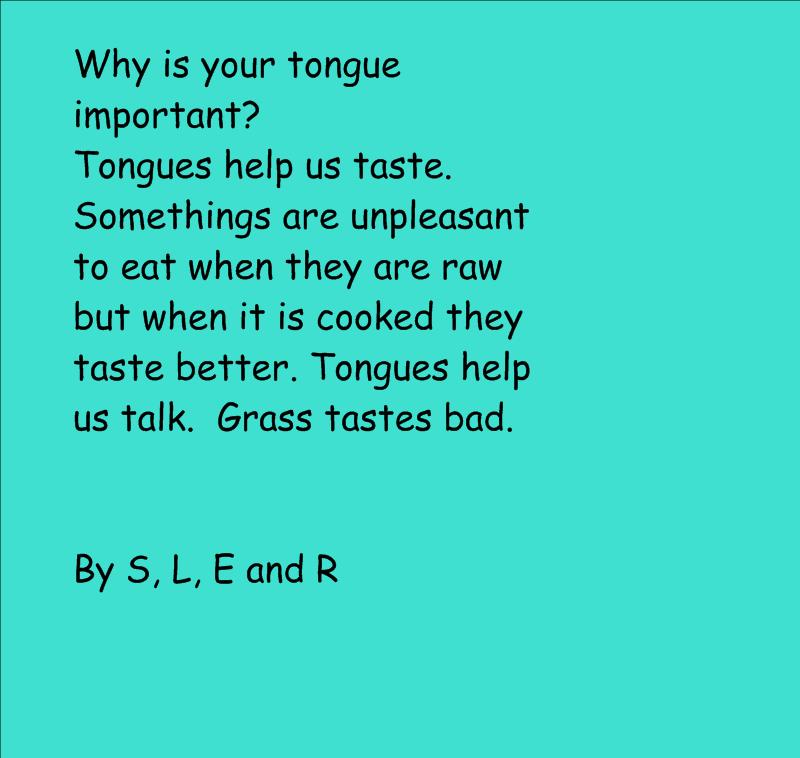
We have been reading a lot of different explanatory texts and working on shared explanatory writing.  Small groups have started working on their own explanatory writing that answers the question Why is your tongue important?  Groups have been working together gathering facts, writing rough drafts, editing and completing a final copy.  This group finished yesterday! 

Reading New Words using Rhymes & Rimes

We found the rhyming words in the poem Bubblegum Benny by Sheree Fitch and then we identified rime patterns and used them to read and sort new words. 

You can download the activity in SMARTnotebook here.


Thursday, February 21, 2013

Recycle for Education Contest Entry

My Grade 1 class decided they'd like to enter the Staples Recycle for Education contest.  They brainstormed things that our school and classroom do to help the environment and wrote their entry today.    Students took turns coming up with the sentence ideas and took turns writing.  Some highlights they pointed our were our school's recycling program and the effort our class has made this year to help animals, including their cookie fundraiser which raised enough money to adopt 7 polar bears. 

Earlier this school year, students worked with our partner classroom, the OLCS Kinders, to come up with ideas to help the earth and make a difference in the world.  I have documented their work with co-author Devon Caldwell at our blog.  You can read about the Grade 1s cookie fundraiser here, including information on their grocery shopping trip, cookie baking with volunteers, adoption application and the arrival of their adoption kits. 

Wednesday, February 20, 2013

Daily 5 Math: Tracker Sheet

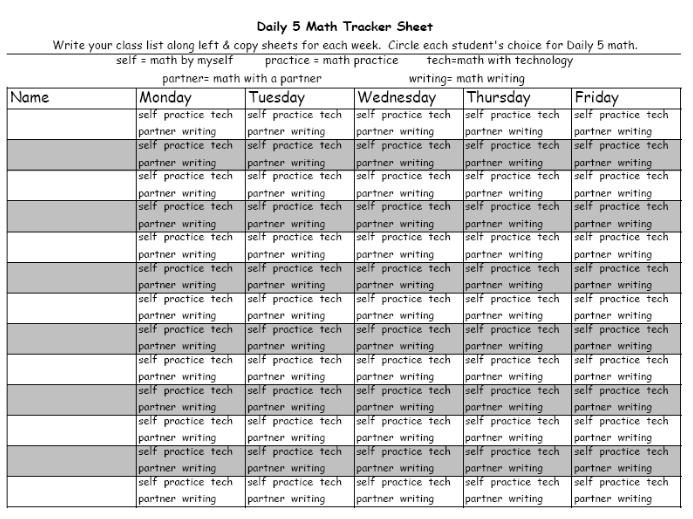
This week I designed my tracker sheet to help me monitor which Daily 5 activities students have completed throughout the week.  You can download the editable Excel file here or the ready to print PDF file here.

Explanatory Text: How do we hear?

Our shared writing from this morning:

Tuesday, February 19, 2013

Explanatory Text: What are the parts of the nose?

We've been reading lots of different explanatory texts that explain things and answer questions.  We also have been learning about our senses. Today, we found information to write our own explanatory text about the nose. 

Math Game: 100 Chart Tic Tac Toe

Materials:
*deck of cards with 10-K removed
*100 chart board
*bingo chips or other markers for each player

How to Play:
The first player selects two cards and covers the 2-digit numbers that can be made with the numbers on the cards.  For example, drawing a 5 and a 3 would mean the player could make 53 and 35 and cover them on the board. 

The second player follows the same steps.

Players continue to take turns until a winner is determined.  The winner is the first person to have 3 numbers covered in a row.

Variations:
*play 4 in a row

Monday, February 11, 2013

Daily 5 Math

I read The Daily 5 by Joan Moser & Gail Boushey this summer and my students and I have really enjoyed using their ideas in our classroom.  After working on Daily 5 literacy since September, we are starting Daily 5 math!  After an inspiring grade group meeting/sharing day in my school division, I finally had an idea of how Daily 5 math would look in my own classroom.  Our divisional consultant shared many ideas for guided math, including this guided math video by Nicki Newton. 

Last week, I worked with students to develop an anchor chart for the Daily 5 math expectations.  Then we started with two choices for Daily 5 Math - Math with Technology and Math with a Partner.  These were the first two options I introduced because they both included activities we have been doing regularly for math centers. Students already had developed stamina for these activities and were familiar with my expectations for them. 

Math with Technology
Students select online math games & activities from our Symbaloo home page, which allows them to easily find games I've introduced before and explore appropriate websites for new games to try.  They independently practice math skills such as addition, subtraction, measurement by comparison and problem solving.  Expectations have been set that we must choose a game that involves math, ensure the content is school-appropriate and make sure the game is a "good fit" - not too easy or too hard.

Math with a Partner
Students find a partner and choose a math game from a selection of games we have already learned how to play.  I have the gameboards and other materials in tubs where students can easily get them out and put them away.  Students can switch games at the completion of a game or choose to play again if time remains in that Daily 5 slot

Math Practice was introduced as a third Daily 5 math choice today.  I created booklets of practice activities for each student and we agreed upon the expectations for this Daily 5 choice.  We decided that it was important to use pencil and to remove sheets from the booklet to hand in only when both sides were complete.  We also talked about what to do if a student could not read the directions independently and decided that we'd try asking a friend (and a 2nd friend if needed) then choose a different page if still "stuck".  We agreed that students could come to me after I was done working with my small group to get help with instructions so that they could complete that activity at another time. Our first practice today went very well  :)

Since my students were already really good at Daily 5 for literacy, they are doing great with Daily 5 math and I looking forward to having more time to work with small groups of students on important math concepts!  Next up will be introducing more of the 5 choices & ensuring students are able to practice independently while I teach others...