Showing posts with label Minecraft. Show all posts

Monday, May 13, 2024

Truth & Reconciliation Monuments with Minecraft Education Edition

 I've been working with Miss. Baker's Grade 5 and 6 class this year to integrate Minecraft EDU with their social studies learning.  In our latest activity, students were challenged to build a monument in Minecraft that represents moving forward with Truth and Reconciliation in Canada.  This learning activity was inspired by the Logics Academy activity: Changemakers of Canadian History.

The students worked in teams to brainstorm possible Monuments and discuss the meanings of the symbols/objects they might construct.  Each team decided on one monument to build and then worked collaboratively to create it in Minecraft.  Students added a sign to explain their monument and took screenshots or screen recordings to share their work.  

Some of the groups chose animals from the 7 teachings, which they'd learned about before.  Other groups designed original Monuments.  

Thanks to the Grade 5 and 6 students for sharing their work to be featured here for others to see! Not all groups had permission to share, but there is a great selection here to check out.  


Tuesday, June 14, 2022

Exploring Canada's History with Minecraft Education Edition


I’ve been working with teachers & students at different schools in Park West School Division to explore Canada’s history with Minecraft EDU projects designed by The Cobblestone Collective.

We have really enjoyed this creative way of thinking about Canada’s past, learning about history and sharing what we know about our history!

The Canada's History Crate from Cobblestone Collective (available as a free download here) includes suggested activities and video lessons guided by 2 teachers. Our learning activities included:

  • Building a settlement in Minecraft
  • Building the Canadian Pacific Railway
  • Learning about Viola Desmond and her work to promote equity, inclusion and human rights
  • Adding an equitable and accessible theatre to our settlements in honour of Viola Desmond
  • Creating pixelated portraits to honour important Canadians from our past
  • Learning about Truth & Reconciliation in Canada
  • constructing a monument to honour the ongoing work of Truth & Reconciliation
  • Researching modern changemakers in Canada
  • Creating a non-player character to represent a modern changemaker that has made a difference in our country
  • Considering what skills and talents we have that could be used to impact Canada and make a difference
  • making a final improvement to our settlements that shows what we want to change in our local or global community

Here are some pieces of student work that showcase some elements of this project. All student work is shared with permission.

Take a tour of one group's project here: 


These screenshots show highlights of the settlement:


These portraits were created by the HCI Grade 6 class. Each team built a portrait and a sign to share information about the significant person they chose.


Miniota Grade 3/4 Minecraft Communities Project

 I was excited when Miss. Emily Hunter invited me to co-plan a Minecraft EDU project for her Grade 3/4 class! She was working with the social studies theme of communities and the science unit focused on structures and materials, so we decided to focus on an interdisciplinary project that would target the outcomes from these units.   Together, we planned a “build challenge” project that allowed her students to showcase their knowledge in both topics.  Students worked individually or with a partner to create a community in Minecraft.  

To show their understanding of curricular outcomes, students made plans for which biome they’d build in and how that environment would affect their community, students identified how their community would ensure residents basic human rights were met and constructed appropriate amenties based on this planning.  Students also came up with laws/rules to be posted in their Minecraft communities and they determined which materials would be most effective for building their community structures (a link to their science outcomes).  The Grade 3 and 4 students also demonstrated social studies skills from their curriculum through effective communication and collaboration, managing information and using critical and creative thinking skills.   

Here is a snapshot of some of the planning students did before beginning their build challenges in Minecraft. 


Once students had a plan, they were given time to build their communities in Minecraft.  Students used the camera and portfolio to take some screenshots of what they had built and they've agreed to share them here so you can see some of what they've created! 


Wednesday, June 23, 2021

How We're Using Minecraft EDU in PWSD

I was so excited to learn that Minecraft Education Edition is now available on Chromebooks since that is the primary device our students use.  I had several colleagues eager to try out Minecraft EDU with their students once it was set up for us this spring.  It's been exciting to see what's possible with Minecraft in the classroom over the last few months.  I wanted to document and share some of the ways that we've used it so far.

Minecraft Water Cycle Representations

Ms. Lee's Grade 8 class at BCI was studying the water cycle when we got access to Minecraft EDU.  Ms. Lee decided to give her students the opportunity to work in small groups to demonstrate their knowledge of the water cycle by building a model of it in Minecraft.  I was really impresssed with students' creativity as they developed their models, especially because many of the things they were representing had to be built out of alternate materials.  For example, I saw some students creating clouds out of wool and invisible processes like evaporation or transpiration were shown through the use of glass panes in Minecraft.  You can check out two tours of a Minecraft water cycle here: 


Manito Ahbee Aki Minecraft World:
Exploring Indigenous Culture and Manitoba's Past

One of the frequent requests we had before Minecraft EDU became available for our school division was to explore the Manito Ahbee Aki world.  This incredible Minecraft world was developed with Louis Riel School Division, a division right here in Manitoba.  When this awesome project was shared in the news, many teachers were excited to experience this Anishinaabe world. 

The Manito Ahbee Aki world is meant for students to explore an area called The Forks (where the Red and Assiniboine Rivers meet here in Manitoba).  This world takes us back in time to learn about traditional ways of living on the land.  Students learn from Knowledge Keepers, explore petroforms (rock formations), gather supplies and craft necessary tools, go on a bison hunt and trade for seeds to start their own garden. I've supported several classes in getting started with the experience and it's been interesting and educational for each group I've worked with.  So far, we've tried in it Grades 4-8.  

Find the world and lesson details here: https://education.minecraft.net/en-us/lessons/manito-ahbee-aki


Pixelated Portraits

Mrs. Shwaluk's Grade 8s created these cool portraits in their art class.  They created a grid over a headshot of themselves, then they chose resources in MinecraftEDU to create a pixelated image of themselves. Mrs. Shwaluk said her students really enjoyed the project and, although she thought it might take a long time to build these, many students completed their portraits in about 30 minutes.  Check out a few samples below:


Survival Tips presented with Minecraft EDU

A few Grade 5 students in Mr. Coughlan's class at HES were researching wilderness survival as part of their Genius Hour projects.  These students thought it would be exciting to present their survival tips in a Minecraft world.  Check out one example below to see how they used Minecraft EDU to share their survival tips:


Thursday, February 20, 2020

A Student Perspective on Minecraft EDU

student-created Minecraft civilizations
After students had completed their Minecraft civilization projects for Mr. Obach's Grade 8 Social Studies class, I asked them to share feedback with me.   This is the first time we've used MinecraftEDU for a classroom project, so I was curious to see what students had to say about their experience.


Here are Kylin's responses to my questions (shared with her permission):


Describe your Minecraft project in 2-3 sentences.  What were you trying to do/show/learn?

We were to make an imaginary civilization with a partner. Our imaginary civilization included a temple, houses, a river, farmland, forest. We used Minecraft to show what our imaginary civilization looked like. 


Positives: What were some of the things you liked about this project?  What are some advantages of using Minecraft for this project? What did you learn?

I liked having the freedom to create a 3D representation of a civilization that was created through imaginary. It was cool because we worked for about 3 hours on our civilization. After three hours of work it was cool to see it coming together, walk through it and see all the things you made.


The main advantage was that once you think up things you can just build it in Minecraft. There are no limits to creativity. You can just think of something and you can build it. If we were to be working on the same thing, it is easier because it would be done faster instead of one person working on it. If we were working on separate things, after you finished something or one person finished something you can immediately start working on other things and not have to worry about finishing other buildings.


I learned that there is a lot of planning to do before you can start creating your civilization.


Challenges: What were some challenges that you faced while working on the project?  


When you first get in, we had trouble finding our partner in the world we created. We eventually found each other and once we did we got straight to work.


The amount of time we had in each class was a challenge. We only have 30 minute classes and if we were to have an hour class I think we would have had more time to add more detail.


You always had to go to the same computer or you had to scroll through your files to find the correct file.


Other: What else would you like people to know about this project? 


I definitely think other students and teachers should try something like this because it is a fun experience and.. It’s just fun! It’s a fun way to learn.


Do you need to be an expert at Minecraft to do something like this?  

No, you do not need to be an expert. It’s super easy to just build anything because all you have to know is how to place a block. That’s it. After that you just create anything with different blocks or materials.


Could MinecraftEDU be used for other projects?

Minecraft would be better for some projects than others.
Wednesday, February 19, 2020

Learning with Minecraft EDU

I've been learning more about Minecraft Education Edition this year and I was excited to visit a Grade 8 class where the students were using this tool for a social studies project.  Mr. Obach's class designed civilizations using Minecraft EDU to demonstrate their learning.  They were asked to address work & trade, architecture, food sources, sustainability and natural environment in their designs. Students were also expected to explain how the environment impacts the civilization.

When I was learning to use Minecraft EDU in my training sessions this fall, I was pretty slow at building and sometimes frustrated when I couldn't quite get things to work.  I failed often.  I was certainly no expert in building with Minecraft.  However, I could see the awesome potential for students to design and create with Minecraft.  I also really liked the Education Edition add-ons such as the camera, book & quill to make it easy for students to document their learning.  

When I met with the Grade 8 class, some of them had previous experience with Minecraft and some did not.  We introduced Minecraft EDU and gave students a bit of time to try it out.  I was impressed with how quickly and easily all students learned the tool and got right to creating their designs.  When I visited the Grade 8s again, they were efficiently collaborating with a partner in a "shared world" to build different elements of their civilizations.  When I asked those students who hadn't used Minecraft about their experience, they told me that they'd found it was easy to get started and fun for them, even though they'd had to figure out a new tool. 

During one classroom visit, students gave me a "tour" of what they'd built .  I was blown away!  They had created incredibly detailed and thoughtful projects.  They explained reasons for creating their civilizations in certain ways and told me about various elements they'd included.  Here are a few pictures of what I got to see that day:


"While I was working on my civilization, I had a lot of fun. I had fun exploring the world I chose and there were so many areas to choose from. Advantages of using this would be that you could let your mind go wild. I really enjoyed working on Minecraft." - Grade 8 student


As part of their assignment, students used the camera and Book & Quill features in Minecraft EDU to document and share their learning.   Check out a few samples from their documentation and notice the variety of elements that were included in their civilizations.


Tuesday, June 21, 2016

Minecraft Animal Homes

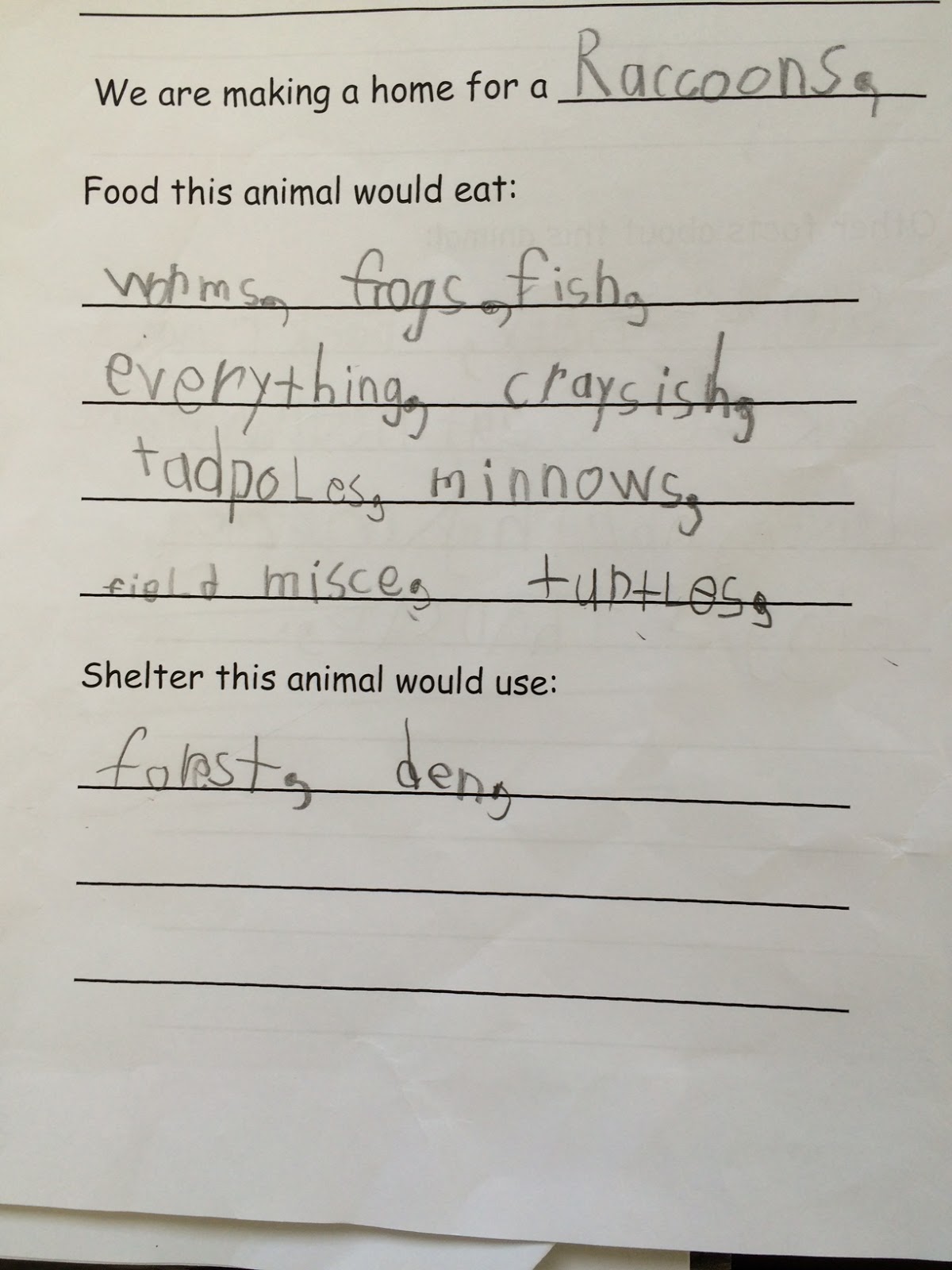
This year, a group of Canadian Microsoft Expert Educators have been working on using Minecraft for learning.  I was inspired by the other educators ideas for using Minecraft in the classroom, so I decided to give it a try with my grade 1 students.  One of our science outcomes is that students will be able to design a representation of a habitat/home that meets the needs of a Manitoba animal, so our Minecraft design challenge focused on that.  We learned about the characteristics and needs of living things as we worked on this project.  Below I have outlined the steps we took in this project.

Brainstorming: Our whole class worked together to brainstorm a list of Manitoba animals.

Setting criteria: We worked together to set criteria for what our animal home designs should include. 

Research: Once we set criteria for the task, I put students into small group and they selected an animal from our list to research.  Groups of three students researched what that animal would need for food and shelter and completed the provided template.


Designing:  Next, students used what they learned in their research to design a representation of an animal home for their animal.  As students did this, I was able to walk around the room and have discussions with students about why they were making certain design choices and how their habitats would meet animal needs.  From those conversations, I could tell that my students had already learned a lot.


Sharing: We tried to present our Minecraft worlds on our interactive whiteboard, but that presentation style didn't work well, so we came up with a new plan to share our work.  Each group took a few screenshots to highlight how their habitat design met the basic needs of their animal.  They added short captions to each screenshot and then created short videos which were shared with the whole class.


Sunday, January 31, 2016

Hack the Classroom: An Inspiring Event

Yesterday was one of those incredible days that I'll remember for a long time.  I was inspired.  Excited. Energized.  Motivated.  Proud.  Empowered.  Being invited to be part of Microsoft's Hack the Classroom was awesome! 

I was invited to this education event to share the story of how my students are learning to code.  Microsoft in Education filmed this video featuring our class and it was shared during the event.


I also had the privilege to be in the studio to hear messages from a group of passionate presenters, including Dale Dougherty, Rafranz Davis and Hadi Partovi.  We were also joined by fellow educator, Jeff Kash, whose classroom was also featured at the event.  

Hadi Partovi is the founder of code.org and he spoke about the need for schools to teach computer science.  An increasing number of jobs require people trained in computer science, but very few schools prepare students to enter post-secondary programs in this area.  Hadi shared about the growing Hour of Code movement and the need for us to teach coding as a basic skill.   Listening to his message live at #hacktheclassroom was SO inspiring and being invited on stage with him was a huge honour for me!


Dale Dougherty is founder and Executive Chairman of Maker Media, Inc. which launched Make: magazine and Maker Faire. He shared his passion for the maker movement and encouraged everyone to discover the joyful process of making.  Maker Faires are hosted all over the world and many schools have created a makerspace for students.  Education resources are available at makered.org

Rafranz Davis is passionate about the power of Minecraft in education. She works as the Executive Director of Professional and Digital Learning for Lufkin School District. She shared examples of how schools can hack the classroom and overcome obstacles to using Minecraft in schools.  One of my favourite parts of her message was when she explained how STUDENTS taught teachers how to use Minecraft as part of their district PD!!  I'm signing up for Minecraft tutoring with one of my grade 1 students ASAP :)
Jeff Kash is a middle years teacher who is using OneNote Class Notebooks in his classroom.  Using this tool, Jeff has made a shift to grading for mastery and has helped his students become more organized.  

If you didn't catch the live event, you can still sign up and watch on-demand here: https://www.microsoft.com/en-us/education/events/hack-the-classroom/default.aspx