Showing posts with label Literacy with ICT. Show all posts

Tuesday, May 24, 2022

Digital Posters by Grade 3/4

I had the opportunity to help Ms. Ward's Grade 3/4 class design digital posters to showcase their knowledge.  We started by reviewing some exemplars from other students and we co-constructed criteria for our own posters.  We reviewed some key skills like changing page layout, adding text boxes, adding images, changing fonts/colours and changing backgrounds.  Then, students used Google Slides with images from pixabay.com to create a poster that met the criteria.  

To learn more about designing digital posters and see more student samples, visit this blog post. 

Thank you to these students for sharing their work with us!


Tuesday, June 22, 2021

Student-Created Book Showcase

 A great way to showcase student work is to create a digital book. We've been using Book Creator in Park West School Division and our students have created some wonderful pieces of work to showcase their writing!  Here are a few examples of digital books students have created this year:

I Wonder...

Mrs. Smart's Grade 4 class created I Wonder books.  They developed 4 I wonder questions about an animal they were curious about, then researched the animal to answer their questions and published a question and answer book with the details they learned.  

A to Zed

Mrs. Gorrell's Grade 2 class was inpsired by a Canadian A-Z book that listed different Canadian items for each letter of the alphabet. They decided to create their own version with an Canadian word for each letter of the alphabet.

Personal Interest

Mrs. Smart's Grade 4s also wrote about one of their personal interests: whether they loved animals or Minecraft, vehicles or sports, students shared about what they love in these books. 

Student Work Showcase

With permission, the following students have shared their work. Check out this Book Creator library for examples of the wonderful work our students have done!  

Tuesday, March 16, 2021

Scavenger Hunts with Seesaw

 More and more teachers in our school division are using Seesaw with students.  Seesaw is a great tool to use for collecting student work samples in a digital portfolio (or learning journal, as Seesaw calls it).  Teachers can also create or source activities for students to complete in Seesaw, which was super helpful during remote learning and continues to be useful for classroom learning activities.  

I've found some good Seesaw scavenger hunt activities created by other teachers and now created some of my own templates to share with colleagues as well.  The concept of a scavenger hunt works well for any grade level and subject area because you can customize your list of scavenger hunt items to whatever skills or knowledge your students are working on.  

I like that these Scavenger Hunt activities allow students to apply their skills and knowledge by finding examples of the concepts they've been working with.  I also like that there are many ways for students to show their examples: they could take a picture, write with the pens, type their response or even take a video.  

Examples of Seesaw Scavenger Hunts:

click the links to find these activities and creators on Seesaw


Seesaw Templates for Creating a Scavenger Hunt


I like to keep a template that I can copy and edit in Seesaw to make new scavenger hunts for different grade levels or subjects. I've created a single page or multipage template, both of which you can access below! You can customize an activity by following the steps here.  


I'm pleased to be part of the Seesaw Ambssador program and I'm happy to share about this tool with my teacher friends and colleagues!  Find me on social if you have questions or would like to connect.

Connect with Leah online:

Twitter: @LeahO77 

Instagram: @kgeducation.ca @mrsobach

Facebook: @kgeducation.ca


Tuesday, January 5, 2021

Cookies for Tanzania: A service learning project & video contest winner!

Congratulations to the Decker Colony School students in Mr. Elias Wipf's ELA class for winning the Next Vista for Learning Service via Video contest!  Their wining video, Cookies for Tanzania, tells the story of how their school has been supporting projects in Tanzania through their fundraising efforts over the past few years. This contest was created to encourage young people to "tell stories of people serving their communities" through video creation. 

The Cookies for Tanzania fundraiser sales were put on hold this year due to COVID, but this group of students found a way to continue contributing to the cause by raising awareness with their video.  Four students collaboratively planned and created the video, including sourcing images, writing a script and narrating the video to tell their story.  They also worked with students, parents and community members to obtain the permissions required for people appearing in the video.  The resulting video is a great showcase for this service learning project -- be sure to watch it below!


The video is now featured in the Next Vista for Learning video library.  

Congratulations to Matt, Gabe, Jesse and Abby on a job well done and to Elias for supporting his students in their video production project!


Wednesday, March 11, 2020

Book Trailers released by Rossburn Elementary School Grade 5/6

Along with some other classes from around PWSD, the Rossburn Elementary School Grade 5/6 class has joined me in creating book trailers for some of their favourite books this year!   Similar to the process we've used with other classes taking part in this project, this group of students viewed sample book trailers, set criteria, made a plan for their video and then started designing with Powtoon.

Here are the videos released by RES Grade 5/6:

Where the Red Fern Grows 
book trailer by Deegan


Hockey Superstars
book trailer by Reid


Bridge to Terabithia
book trailer by Anna


Patches
book trailer by Faith


Front Desk
book trailer by Tatum


Where the Red Fern Grows
book trailer by Jackson


The Maze of Bones
book trailer by Natalie


See more trailers by Park West School Division students

Book trailers released by Decker Colony School 

Book trailers by MPS Grade 6

More book trailers by MPS Grade 6 

Tuesday, March 10, 2020

Book Trailers released by Decker Colony School!

One of the projects I have done with students this year is creating Book Trailers.  The latest book trailer releases come to us from the Decker Colony School Grades 7 & 9 class.  This group of students began by planning their trailers with a graphic organizer.  We viewed some sample book trailers (both professionally-created and student-created) and set criteria for their work.  Next, students had an overview tutorial of WeVideo.  We reviewed the basics of how to use this video creation tool, which we are currently accessing as part of our Edwin pilot.   Students eagerly got started with this video creation project. 

When I returned to visit this classroom last week, it was evident that students had worked diligently to create book trailers which convey the mood and message of their chosen novels.  I was impressed by their video design skills, including their choice of music, images and fonts to enhance their trailers.  These book trailers sure do the job of hooking a viewer - I want to read them all now that I've watched these!

Check out their awesome work below:

Camp Blackeagle by Sigmund Brouwer
Book trailer by Matthias


Ranger's Apprentice: The Ruins of Gorlan by John Flanagan
Book trailer by Alex


The Emperor's Code by Gordon Korman (39 Clues)
Book trailer by Gabriel


The False Prince by Jennifer A. Nielsen
Book trailer by Daniel


The Night They Stole the Stanley Cup by Roy MacGregor
Book trailer by Jesse

Monday, March 9, 2020

Booksnaps by SCS Grade 10

I visited the SCS Grade 10 ELA class last week to introduce them to a different kind of reader response: booksnaps!   The idea of a booksnap (inspired by Tara Martin) is to "snap" a picture of a page in your text which you reacted to and then respond to the text by adding emojis and a short annotation explaining your response.   Booksnaps are a fun way for students to show their thinking about a text.  Students explore their response to the text and demonstrate understanding when choosing symbols and a caption that reflect their ideas about the selected section. 

For this class, students began by reading their choice novels with instructions from their teacher to flag something significant with a sticky note.  The class discussed that a significant passage could be something important to the plot or something that caused a reaction from them.  Once students had some time to read, we introduced the concept of booksnaps by presenting a few samples (student-created and teacher-created examples).  Through examining samples, we set criteria for their work.  Then, it was time to get snapping!

Students returned to the passage they had flagged as significant or read on to find an appropriate section to "snap".  This group of students primarily used SnapChat to create their booksnaps.  (PicCollage, SeeSaw, Google Slides and other tools also work well for creating them.)  Once they had a picture of a page in their book, students added their annotation, emojis and the title and author of the text. When their booksnaps were complete, they downloaded their snaps (rather than sending them to one of their contacts).  Then, students submitted their work to their teacher via Google Classroom.  Their finished products were very well done!

The following are Booksnap examples from this great group of students.
(*shared with permission* thanks for sharing*)


Monday, February 24, 2020

The Wax Museum: A BCI Grade 7 Class Project

I was recently invited to attend a unique museum exhibit.  It was held at a local school and organized by a group of Grade 7 students.  This talented crew of students featured important activists with various exhibits around the school library.   Not only did they research the activists and develop the displays, they also posed as the "wax statues" of the people they'd researched.   I was so impressed with this project and was excited when the class gave me permission to write about their work!  I've shared the details of this project from my perspective in hopes that some other students and teachers might be inspired to try a project like this.

Each student in Mrs. Bowley's class selected an activist to focus on for the project.  I saw displays on Rosa Parks, Desmond Tutu, Cesar Chavez, Craig Keilburger, Malcolm X, Viola Desmond, Agnes Macphail and more.  Students researched the significant life events and important contributions of their activist.  Students created an audio recording explaining important information about their activist.  They used first person narrative to share the facts they'd uncovered through their research in a unique and engaging way.   Students used the Audio editor & music editor AudioStudio Chrome extension to record on their Chromebooks.   Many students sourced royalty-free background music to enhance their audio.

Each student created a poster for their display, which included some key details about the activist, along with a QR code linking to their recording.   This format allowed museum visitors to view each display while listening to the audio on their phone or personal device. As guests moved through the exhibit, students posed as their activist, wearing costumes selected from the local Value Shoppe. 

I really enjoyed the time I spent visiting each display.  As I scanned each QR code, I learned more about the activists featured at the museum.   Many of the people were ones I'd heard of before, but I got to learn new things as I listened to the students' work.  It was an interesting museum for both the adults and students who had the opportunity to visit it.

As the Literacy with ICT Teacher Leader for our school division, I noticed that students had used many important skills in developing their project.  A few important LwICT skills that I saw evidence of were:

Gather & Make Sense:  students conducted research to gather information on their activist, they organized that information and made sense of it in order to create their posters and recordings

Produce to Show Understanding:  students created their posters, audio recordings and their display to demonstrate their understanding of the person they researched

Communicate:  students communicated their ideas to an audience of museum visitors with this project.  They developed an engaging museum exhibit that used various components to share knowledge with others.

I know that students also used their ELA skills in their research, writing and recording and demonstrated an understanding of their Social Studies outcomes through this project.   It was awesome to see student learning showcased in this unique project! 

Thursday, February 20, 2020

A Student Perspective on Minecraft EDU

student-created Minecraft civilizations
After students had completed their Minecraft civilization projects for Mr. Obach's Grade 8 Social Studies class, I asked them to share feedback with me.   This is the first time we've used MinecraftEDU for a classroom project, so I was curious to see what students had to say about their experience.


Here are Kylin's responses to my questions (shared with her permission):


Describe your Minecraft project in 2-3 sentences.  What were you trying to do/show/learn?

We were to make an imaginary civilization with a partner. Our imaginary civilization included a temple, houses, a river, farmland, forest. We used Minecraft to show what our imaginary civilization looked like. 


Positives: What were some of the things you liked about this project?  What are some advantages of using Minecraft for this project? What did you learn?

I liked having the freedom to create a 3D representation of a civilization that was created through imaginary. It was cool because we worked for about 3 hours on our civilization. After three hours of work it was cool to see it coming together, walk through it and see all the things you made.


The main advantage was that once you think up things you can just build it in Minecraft. There are no limits to creativity. You can just think of something and you can build it. If we were to be working on the same thing, it is easier because it would be done faster instead of one person working on it. If we were working on separate things, after you finished something or one person finished something you can immediately start working on other things and not have to worry about finishing other buildings.


I learned that there is a lot of planning to do before you can start creating your civilization.


Challenges: What were some challenges that you faced while working on the project?  


When you first get in, we had trouble finding our partner in the world we created. We eventually found each other and once we did we got straight to work.


The amount of time we had in each class was a challenge. We only have 30 minute classes and if we were to have an hour class I think we would have had more time to add more detail.


You always had to go to the same computer or you had to scroll through your files to find the correct file.


Other: What else would you like people to know about this project? 


I definitely think other students and teachers should try something like this because it is a fun experience and.. It’s just fun! It’s a fun way to learn.


Do you need to be an expert at Minecraft to do something like this?  

No, you do not need to be an expert. It’s super easy to just build anything because all you have to know is how to place a block. That’s it. After that you just create anything with different blocks or materials.


Could MinecraftEDU be used for other projects?

Minecraft would be better for some projects than others.
Wednesday, February 19, 2020

Learning with Minecraft EDU

I've been learning more about Minecraft Education Edition this year and I was excited to visit a Grade 8 class where the students were using this tool for a social studies project.  Mr. Obach's class designed civilizations using Minecraft EDU to demonstrate their learning.  They were asked to address work & trade, architecture, food sources, sustainability and natural environment in their designs. Students were also expected to explain how the environment impacts the civilization.

When I was learning to use Minecraft EDU in my training sessions this fall, I was pretty slow at building and sometimes frustrated when I couldn't quite get things to work.  I failed often.  I was certainly no expert in building with Minecraft.  However, I could see the awesome potential for students to design and create with Minecraft.  I also really liked the Education Edition add-ons such as the camera, book & quill to make it easy for students to document their learning.  

When I met with the Grade 8 class, some of them had previous experience with Minecraft and some did not.  We introduced Minecraft EDU and gave students a bit of time to try it out.  I was impressed with how quickly and easily all students learned the tool and got right to creating their designs.  When I visited the Grade 8s again, they were efficiently collaborating with a partner in a "shared world" to build different elements of their civilizations.  When I asked those students who hadn't used Minecraft about their experience, they told me that they'd found it was easy to get started and fun for them, even though they'd had to figure out a new tool. 

During one classroom visit, students gave me a "tour" of what they'd built .  I was blown away!  They had created incredibly detailed and thoughtful projects.  They explained reasons for creating their civilizations in certain ways and told me about various elements they'd included.  Here are a few pictures of what I got to see that day:


"While I was working on my civilization, I had a lot of fun. I had fun exploring the world I chose and there were so many areas to choose from. Advantages of using this would be that you could let your mind go wild. I really enjoyed working on Minecraft." - Grade 8 student


As part of their assignment, students used the camera and Book & Quill features in Minecraft EDU to document and share their learning.   Check out a few samples from their documentation and notice the variety of elements that were included in their civilizations.


Tuesday, February 18, 2020

New Book Trailers released by MPS Grade 6

The Grade 6 class at MPS continues to work on producing book trailers featuring some of their favourite books.   To see previous releases, check out this post.

Once students have their trailer ready in Powtoon, we've been watching them in small groups to give feedback based on the criteria we set at the start of the project.   Students then have the opportunity to make revisions before exporting their video.   Here are the latest trailers from this talented group of young video producers!

Sisters by Raina Telgimar
Book Trailer by Kimy 


Secrets and Scones by Laurel Remington
Book trailer by Tara


I Survived the Children's Blizzard 1888 by Lauren Tarshis
Book trailer by Owen 


The Junction of Sunshine & Lucky by Holly Schindler
Book trailer by Chloe 


Middle School: Just My Rotten Luck by James Patterson
Book trailer by Evan


Too Much Drama by Laurie Freidman
Book trailer by Alexis


Friday, January 31, 2020

Designing Digital Posters with Binscarth Grade 7/8

I had the opportunity to work with an awesome group of Grade 7 and 8 students at Binscarth School last week.  This group of students used Canva to design digital posters related to the concepts they are studying in science class.   The posters turned out really well, so I asked students for permission to share their work here on my blog - you can see their designs below!

Designing digital posters is about more than just learning to use technology tools.  This project integrated important Literacy with ICT skills and science knowledge.  

  • We began by co-constructing criteria for our work, which relates to LwICT outcome P-1.2 participates in establishing criteria for own work. 
  • Next, students had to select a concept/term from their science studies and develop a description/definition of the term (which links to science outcome 8-3-01 Use appropriate vocabulary related to their investigations of fluids and LwICT outcomes G-1.1 gathers information from given source(s) and G-2.1 identifies relevant information from sources)
  • Then, students had to select images that related to their concept and design a poster that conveyed the meaning of their concept/word (which links to the "Produce to Show Understanding" section of our LwICT continuum, particularly P-2.1 uses a given format to demonstrate learning and P-3.1 edits work based on feedback from teacher and/or peers, according to established criteria, conventions, and/or standards). 
  • The final designs turned out really great!  Plus, I think that students will be able to use their knowledge of how to design digital posters as a way of sharing their learning for other projects and activities.  


P.S.  Canva recently announced free premium accounts for educators - get the details here!

Wednesday, December 18, 2019

Book Trailers by MPS Grade 6

Mr. Baskerville's Grade 6 class at Major Pratt School has been working on creating book trailers to showcase some of their favourite books!   We started by watching some book trailers and determining what elements should be included in a good book trailer.   This process of co-constructing criteria gave students a list of elements and features to include in their videos.

Next, students were given a graphic organizer to plan the content for their trailer.  Once students had done some planning for their trailers, they were introduced to Powtoon and given an overview of the tool.   Students were also introduced to sites for sourcing public-domain images such as Pixabay and Unsplash.

Students then spent additional work sessions putting together graphics, text, animations and music to bring their plans to life!   Some of the book trailers are now complete and published on YouTube (with permission). 

Watch some book trailers below to see the final products or visit our YouTube playlist.

The Truth About Twinkie Pie by Kat Yeh
Book trailer by Julie


Diary of a Wimpy Kid - Dog Days by Jeff Kinney
Book trailer by Otello


Diary of a Wimpy Kid- Meltdown by Jeff Kinney
Book trailer by Kenneth


Zombies Attack! The Rise of the Warlords Book 1 by Mark Cheverton
Book trailer by Drighton

I Survived the Hindenburg Disaster by Lauren Tarshis
Book trailer by Alex

Can You Say Catastrophe?  by Laurie Friedman
Book trailer by Alexsa


TBH, This is So Awkward by Lisa Greenwald
Book trailer by Charlie


Haunted Canada by Joel A. Sutherland
Book trailer by Caden


I Survived the Attack of the Grizzlies by Lauren Tarshis
Book trailer by Katie
Jedi Academy by Jeffrey Brown
Book trailer by Nathan

Wednesday, June 20, 2018

Skype Cooking Lessons with Chef Paola

I was part of a really special learning experience at Major Pratt School over the last few weeks.  MPS foods classes had the opportunity to work with a professional chef from Italy thanks to the technology available in our schools.  Chef Paola Martinenghi presented a 3 part series for students via Skype.   Her classes focused on Italian food and culture.   Chef Paola is incredibly passionate and she was an enthusiastic and knowledgeable presenter.   We are very grateful to The Chef and The Dish for making this connection possible.  It was such an exciting opportunity to have Park West School Division students connect with an expert in this way!  Thank you to Mrs. Nemez and Mrs. Falkevitch for inviting me to be part of this learning experience in your classroom!


Class 1: The Importance of Food, Country and Culture
Chef Paola's first session focused on iconic Italian foods.  We were transported right into her kitchen in Italy with high-quality video and audio.  As we were getting to know each other, she reached back to grab a bag of Manitoba flour off her shelf!  It was pretty incredible to see one of our province's products in her hands.   For our first class, Chef Paola taught us about where certain foods are produced and talked about the history and culture related to some of our favourite Italian foods.   Chef Paola's enthusiasm engaged us as she told stories of how parmesan cheese is made, where pizza originated and how foods become traditional.  Each group of students had slightly different experiences depending on their questions and interests.  When talking about their first impressions, everyone agreed that Chef Paola was an intelligent and passionate presenter!


Class 2:  Cooking with an Expert
The second class with Chef Paola was a cooking demonstration, which students really enjoyed.  She prepared traditional Italian foods with each class.  Each group of students watched her prepare bruschetta, studying her ingredients, techniques and tools.   She also prepared pesto with some classes.   Seeing Chef Paola in action in her kitchen at home was an awesome experience!   She told us about the local ingredients she used and explained the importance of using ingredients from her region.   To conclude the class, Chef Paola issued a challenge.   Students were asked to prepare their own, creative versions of bruschetta using any locally-available ingredients.


The Cooking Challenge
In the days between classes with Chef Paola, students worked together to create their own versions of bruschetta.   They used the concept of bread with chopped toppings, but tried substituting a variety of ingredients for the traditional tomato, cheese and basil.   

Class 3:  Sharing the Results
In the third and final session, students presented their bruschetta creations to Chef Paola.   Using screen sharing, students were able to share photos of their bruschetta interpretations.  Students talked about the ingredients they used, reasons for choosing those ingredients and answered questions posed by Chef Paola.   Chef Paola offered feedback on each group's work and provided tips and suggestions.  After presenting their creations, students were able to ask questions and hear a few more stories from Chef Paola. 


Enhancing Education with ICT
I was really pleased to be part of such an exciting learning opportunity.   I really liked that students used technology to connect with an expert to enhance their learning.  I thought that the cooking challenge was a great way to connect the digital, online learning experience with the in-class learning.  The high-quality video calls were an awesome way to see a professional chef in action.  For me, this experience underscores the potential for technology to enhance learning. 

Want to try it?
The Chef and The Dish offers Skype cooking sessions with a selection of master chefs from around the world.   The business typically offers in-home sessions, but they were willing to adapt their sessions for a classroom.   Check out their website for more information!

Thursday, June 7, 2018

Creativity, Communication & Citizenship: Brilliant Book Trailers!

One of the awesome parts of my job as LwICT Teacher Leader is that I get to be involved with a wide variety of learning activities.   In May, I was invited to help Mrs. Bowley's grade 7 class with a really awesome book trailer project.  Students viewed a variety of book trailers before selecting a favourite text and planning their own book trailer.  The grade 7s used iMovie to create their trailers and then uploaded them to YouTube.  Next, they made posters with QR codes linked to their videos so they could share their book recommendations by displaying the posters at their school. 

What I Like...

I think the final videos are really well done and I've got a long list of books I want to read after watching them!   There was a lot to like about this project, but some aspects that stood out to me included:

Creativity and Communication 
Bringing together images, text and music to create a compelling book trailer video required creativity and this group of students certainly let their creativity shine!  The project also required effective communication.  Students demonstrated their understanding of a text and conveyed the essence of the book by selecting appropriate elements to include in their video. 

ICT Infusion
This project is a great example of how ICT can support and enhance learning.   Students were able to use technology tools to demonstrate their understanding and knowledge of a text.   I also really like how technology enabled sharing in this example; the QR code posters and video links are great ways for students to share their work with a wider audience.  I think other students and teachers will enjoy watching these!

Digital Citizenship
When I first visited the grade 7 class to help get their book trailers started, we discussed copyright and the need to respect others' work.   We talked about sources for public domain images and royalty-free music.   I know that these thoughtful conversations continued because I heard more about digital citizenship when I returned for my next visit.  I learned that the students did some research on acceptable use and discussed how copyright was applicable to this project.  Students also discussed  sharing their work and considered which platform to use, how much personal information to include and how the videos would be shared.  I was happy to see and hear students thinking about digital citizenship as they worked on this project.   

Watch These!

Okay, you've got my perspective on this cool project - now it is time to watch some samples!   Thanks to Mrs. Bowley's class for sharing the book trailers below!   They are definitely worth watching.  You might even want to compile a list of books to enjoy this summer.   

The Maze Runner 


Divergent


Girl, Stolen


If I Stay


Miss. Peregrine's Home for Peculiar Children


Remember Me Always


Where She Went


The Hunger Games


Pitch Black


Everything, Everything


Wednesday, May 23, 2018

Produce to Show Understanding: Designing Digital Posters

In Manitoba, we have a Literacy with ICT model for 21st century learning.   Our aim is to support students in developing skills to think critically and creatively using ICT .  One of the Literacy with ICT resources available is a continuum of skills.   The continuum includes goals for students to "Produce to Show Understanding".   We want students to demonstrate understanding of their learning, which can be achieved using a variety of formats.   In addition to the more traditional ways that students can share their knowledge, there are many ways that students can share their learning using technology.   One option that I have explored in PWSD classrooms this year is having students design digital posters to demonstrate their understanding. 

Possibilities
When supporting the use of technology in our school division, I aim to be responsive to the goals and needs of students and teachers.  I try to find ways for technology to support or enhance the learning already happening in classrooms.  Supporting students with designing digital posters is an activity that fits well with a variety of learning activities.   I've worked with students and teachers to create digital posters for a variety of subjects/topics.  Here are a few examples:
  • designing posters to share highlights from a social studies inquiry topic such as Canada's North
  • producing digital posters with key information about endangered species as part of a research project 
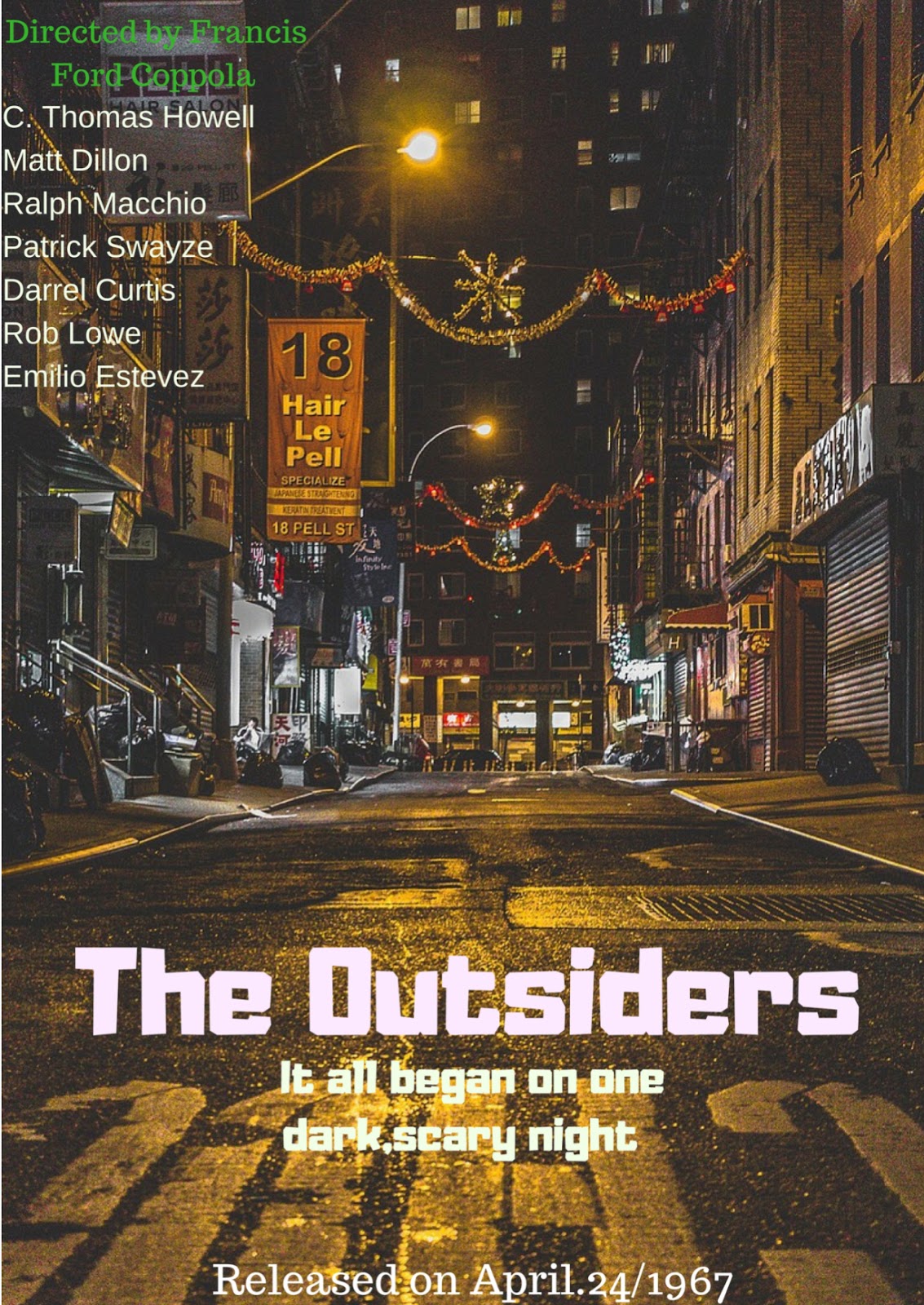
  • creating movie posters based on a novel
Thinking Critically and Creatively 
Students engaging in the task of designing digital posters often have to summarize or parse down  information, which is an important critical thinking skill.   They also have to make design decisions about font, images, spacing and style.  Designing a digital poster requires creative skills just like designing on paper!   

Going Beyond the Classroom
I'm passionate about students sharing their work beyond the classroom, so I really like that these posters can easily be shared with a wide audience.   Some classes have shared their work on social media and some have allowed me to share their work here on my blog and/or on my social media channels.   Digital posters can easily be uploaded to a variety of platforms for sharing.  This relates to another dimension of our Literacy with ICT continuum, focused on communication.  We want students to be able to share ideas, information and work.

Tech Tools
Students designing posters on iPads used PicCollage.  Students designing on computers created student accounts at Canva.  I encourage students to source public domain images from Pixabay (web or app based) or similar sites. 

Student Samples: The Outsiders
I worked with Mrs. Dyck's ELA class at Strathclair Community School this month to support them in designing digital movie posters.   The class had just read the novel The Outsiders by S.E. Hinton and Mrs. Dyck tasked them with designing a catchy poster for the video version.   Students were asked to research the actual cast, release date and producer of the film and then to use their creative talents to develop a tag line.  Students were encouraged to make their designs visually appealing and easy to read.  Check out their work below!


Thanks to Mrs. Dyck's class for sharing your work!